Photomode
Probably the biggest feature of the patch, is the numerous additions to the photomode :
- Enhanced camera : Free camera upgrade, Aspect ratio, QoL (Camera speed/lock, increased range), Collision control
- NPC : Add and pose, up to 3 NPCs, Hide surrounding NPCs.
- Lights : Add and setup, up to 3 spotlights (Colors, Brightness, Range, Angle)
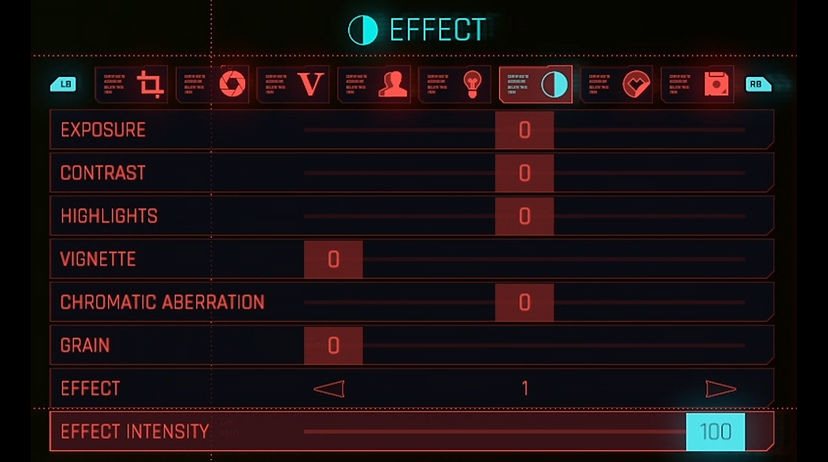
- QoL : Effect Intensity, Bigger range of values on sliders.
IGN France wrote an article about it (Link) !
Enhanced camera
The drone camera, previously locked onto the player, has been replaced with a free camera offering significantly increased movement range around the character.
To improve precision, a new slider allows players to adjust camera speed to their preference. Additionally, a camera lock feature prevents accidental movement, ensuring that nothing ruins the amazing player's framing.
Further eliminating restrictions when positioning the camera, players can now toggle collision for their camera with props and environment with an On/Off selector (default: On).
Photo Mode now includes aspect ratio options to mimic real-life photography.
Previously restricted to the game's default 16:9 widescreen, players were breaking their neck to take portraits, since they can rotate the camera by 90° then later flip the picture (making it 9:16).
The menu option offers six aspect ratios—three for portrait and three for landscape formats.
When switching ratios, the frame crop automatically centers on the screen, ensuring a seamless and user-friendly experience for capturing perfect shots.
I took charge of the implementation of all aspect ratios in the game.
NPC
A new dedicated "NPCs" tab makes its appearance, allowing players to spawn and pose up to 3 NPCs on the scene.
A tile view, similar to the sticker menu, allows players to pick and choose up to three NPCs. Clicking on a tile opens a pop-up with a scrollable list of 23 available NPCs. NPCs now share the same robust system as V, offering full control over their positioning and poses for creative scene setups.
Surrounding NPC's visibility can be toggled by players within the scene using a selector.
I took care of implementing all NPCs entities in the engine and code, also managing their appearance, which was a rather technical challenge.
Lights
Adding lights to a photo scene can make a huge difference, giving it different tones to highlight subjects.
Players can now freely set up 3 spotlights, move them around or control these options :
- On/Off : Activate or deactivate the selected light in scene.
- Shadows : Determines whether the selected light will cast shadows in the scene.
- Brightness : Adjust the light intensity from 0% (turned off) to 100% (really bright).
- Outer Angle : Sets the radius of the selected spotlight, defining the spread of light.
- Inner Angle : Controls how sharp or diffused the edges of the light appear.
- Range : Determines how far the light can reach.
- Hue : Changes the color of the light on a 360° spectrum.
- Saturation : Modifies the intensity of the light’s color.
- Luminosity : Modifies the intensity of the light’s luminosity.
QoL
A new slider has been added to manage filter opacity, allowing players to adjust the transparency from 0% to 100%. For example, a 20% slider setting applies 20% opacity to the filter. The slider is conveniently located beneath the filter selection for easy access.
Photographers frequently noted the limitations of slider values, prompting the creation of mods to address this issue.
I manually increased these values, ensuring all players can enjoy greater flexibility and creative freedom.